Introduction
Artificial intelligence has transformed the way people work, learn, and manage information. In 2026, AI productivity tools have become essential for students, professionals, content creators, startups, and businesses looking to improve efficiency and reduce repetitive work. Instead of switching between multiple applications for writing, note-taking, project management, and collaboration, users now expect intelligent tools that can streamline their entire workflow.
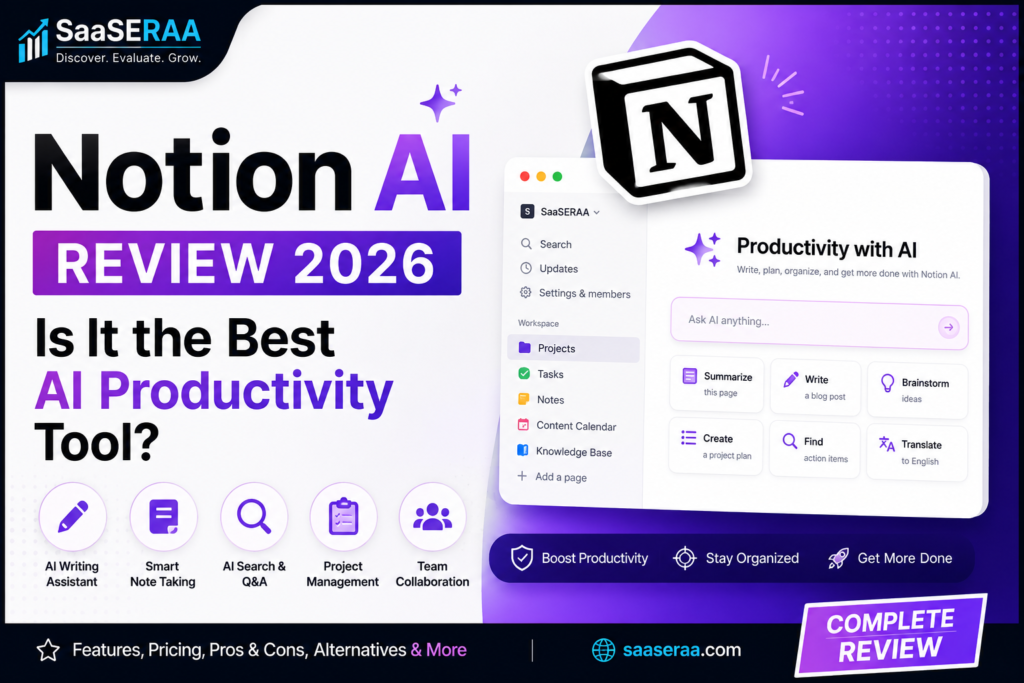
Among the growing number of AI-powered productivity platforms, Notion AI has emerged as one of the most popular and practical solutions available today. Built directly into the Notion workspace, Notion AI combines artificial intelligence with note-taking, knowledge management, project organization, and content creation features.
Unlike standalone AI chatbots, Notion AI works within your existing documents, databases, and projects. This integration allows users to generate content, summarize information, answer questions, and organize knowledge without leaving their workspace.
In this comprehensive Notion AI Review 2026, we’ll examine its features, pricing, pros, cons, alternatives, and use cases to determine whether it deserves its reputation as one of the best AI productivity tools available today.
Quick Verdict
Notion AI remains one of the most powerful productivity-focused AI tools in 2026. Its seamless integration within the Notion ecosystem, combined with strong writing assistance, knowledge management, and collaboration capabilities, makes it an excellent choice for students, bloggers, freelancers, startups, and businesses.
What is Notion AI?
Company Overview
Notion is one of the most popular workspace and productivity platforms in the world. Originally launched as a note-taking and project management solution, Notion quickly gained popularity because of its flexibility and ability to combine multiple productivity tools into one workspace.
Over the years, the platform evolved from a simple note-taking application into a complete productivity ecosystem used by individuals, startups, and large organizations. Recognizing the growing importance of artificial intelligence, Notion introduced Notion AI to help users work smarter and more efficiently.
Today, Notion AI is deeply integrated into the platform, allowing users to generate content, summarize information, answer questions, and organize data without relying on external AI tools.
The company’s mission remains focused on helping people organize information, improve collaboration, and increase productivity.
What Makes Notion AI Different?
Several factors separate Notion AI from many competing AI tools.
Built Directly into the Notion Workspace
Unlike standalone AI assistants, Notion AI operates within your existing workspace.
Users can access AI functionality directly inside documents, notes, databases, and projects.
AI-Powered Knowledge Management
Notion AI excels at organizing and retrieving information.
Instead of simply generating text, it helps users manage large amounts of knowledge efficiently.
Productivity-Focused Features
The platform prioritizes practical productivity tasks such as note-taking, summarization, project management, and content organization.
Seamless Workflow Integration
Because AI is built into the platform, users can stay focused without switching between multiple applications.
Who is Notion AI For?
Notion AI serves a wide range of users, including:
- Students
- Bloggers
- Content creators
- Freelancers
- Teams
- Startups
- Businesses
Whether you’re managing projects, creating content, organizing research, or collaborating with a team, Notion AI provides valuable productivity tools.
Notion AI Features
AI Writing Assistant
One of Notion AI’s most popular capabilities is its writing assistance feature.
Content Creation
Users can generate content directly within their workspace.
Examples include:
- Blog posts
- Article outlines
- Brainstorming ideas
- Marketing copy
- Social media content
This helps creators overcome writer’s block and speed up content production.
Blog Writing
Bloggers can use Notion AI to:
- Generate article ideas
- Create outlines
- Draft content
- Improve readability
This makes it a useful companion for content marketing workflows.
Draft Generation
Instead of starting from a blank page, users can create first drafts quickly and refine them later.
Idea Brainstorming
Notion AI helps users generate:
- Topic ideas
- Headlines
- Content strategies
- Creative concepts
This can save significant planning time.
Content Editing
Notion AI also acts as an editing assistant.
Grammar Correction
The AI can identify and correct grammatical errors automatically.
Rewriting
Users can rewrite content to improve clarity, readability, or engagement.
Tone Adjustment
Content can be adjusted to match different tones such as:
- Professional
- Friendly
- Casual
- Formal
This flexibility is valuable for marketers and businesses.
Summarization
Information overload is a common productivity challenge.
Notion AI helps solve this through summarization features.
Long-Form Content Summaries
Users can summarize lengthy documents into concise key points.
This saves time when reviewing reports, articles, or research materials.
Meeting Notes Summaries
Meeting notes can be condensed into actionable summaries.
This helps teams quickly identify important decisions and next steps.
AI Note Taking
Note-taking remains one of Notion’s core strengths.
Smart Notes
Notion AI helps organize information more effectively.
Users can quickly capture ideas, research, and important information.
Meeting Notes
The platform makes documenting meetings easier through AI-powered organization and summarization.
Knowledge Management
Users can build centralized knowledge bases that become easier to search and maintain with AI assistance.
Notion AI Features (Continued)
AI Search
Finding information quickly is critical for productivity, especially when managing large amounts of content.
Workspace Search
Notion AI significantly improves the search experience by helping users locate documents, notes, databases, and project information instantly.
Instead of manually browsing folders and pages, users can ask questions in natural language and receive relevant results.
Knowledge Retrieval
As workspaces grow, information often becomes difficult to manage.
Notion AI helps retrieve:
- Project documentation
- Research notes
- Meeting records
- Business processes
This reduces the time spent searching for information.
Context Awareness
Unlike traditional search engines, Notion AI understands the context of your workspace.
It can identify relationships between documents and provide more relevant results based on the content stored inside Notion.
AI-Powered Project Management
Notion AI is not just a writing tool—it also improves project organization and workflow management.
Task Creation
Users can quickly generate tasks from:
- Meeting notes
- Brainstorming sessions
- Project discussions
This helps ensure important action items are not overlooked.
Project Planning
Notion AI can assist with:
- Project roadmaps
- Planning documents
- Timelines
- Goal setting
Teams can organize projects more efficiently while reducing manual planning effort.
Workflow Automation
AI-powered workflows help streamline repetitive processes.
Examples include:
- Generating task lists
- Creating summaries
- Organizing project updates
- Automating documentation
Productivity Tracking
Businesses and teams can monitor progress more effectively using Notion’s integrated workspace management features.
Database Assistance
One of Notion’s most unique strengths is its flexible database system.
Database Creation
Notion AI helps users build databases faster by suggesting structures and layouts.
Examples include:
- Content calendars
- CRM systems
- Project trackers
- Knowledge bases
Data Organization
The AI can assist with organizing information into logical categories and structures.
This improves workspace efficiency and usability.
Automated Suggestions
Users receive intelligent recommendations for:
- Tags
- Categories
- Database fields
- Workflow improvements
Content Structuring
Organizing information becomes easier with AI-powered formatting and content arrangement.
This is especially useful for teams managing large knowledge repositories.
AI Q&A
The AI Q&A feature is one of Notion AI’s most practical productivity tools.
Ask Questions About Your Workspace
Users can ask questions such as:
- What were the action items from last week’s meeting?
- What tasks are assigned to the marketing team?
- Summarize the product launch project.
The AI searches workspace content and provides relevant answers.
Instant Answers
Instead of manually reviewing documents, users receive immediate responses.
This saves time and improves decision-making.
Research Assistance
Researchers, students, and content creators can use AI Q&A to extract key insights from stored information quickly.
Team Collaboration
Collaboration is one of the primary reasons businesses choose Notion.
Shared Workspaces
Teams can collaborate within a centralized workspace.
Benefits include:
- Better organization
- Improved communication
- Shared documentation
Real-Time Editing
Multiple users can work on documents simultaneously.
This reduces delays and improves teamwork.
Team Knowledge Base
Businesses can create internal knowledge bases containing:
- SOPs
- Training materials
- Documentation
- Company policies
Notion AI helps maintain and organize these resources.
Communication Support
AI-generated summaries and documentation reduce communication gaps between team members.
Content Generation
Notion AI includes several content generation capabilities beyond simple writing assistance.
Blog Outlines
Users can quickly generate structured outlines for articles and blog posts.
This is particularly useful for:
- Bloggers
- Affiliate marketers
- Content agencies
Marketing Content
The AI can assist with:
- Ad copy
- Landing page content
- Promotional messages
- Marketing campaigns
Social Media Posts
Users can create content for:
- X (Twitter)
without leaving the Notion workspace.
Email Drafts
Businesses can generate:
- Newsletters
- Outreach emails
- Customer communication
- Internal announcements
quickly and efficiently.
Notion AI Pricing
Notion offers multiple pricing plans designed for different types of users.
Free Plan
The free version allows users to explore the platform and basic productivity features.
Features Included
Users receive:
- Personal workspace
- Note-taking tools
- Basic collaboration
- Limited AI access
Limitations
The free plan may include restrictions on:
- Team collaboration
- Advanced workspace management
- AI usage limits
Despite these limitations, it provides a solid starting point.
Plus Plan
Pricing
The Plus Plan is designed for individuals and small teams requiring more advanced functionality.
Features Included
Users gain access to:
- Increased storage
- Better collaboration tools
- Expanded permissions
- Enhanced workspace management
Best For
- Individuals
- Students
- Freelancers
Business Plan
Pricing
The Business Plan focuses on team productivity and collaboration.
Collaboration Features
Additional benefits include:
- Advanced permissions
- Team management
- Security controls
- Larger collaboration capacity
Best For
- Teams
- Startups
- Growing businesses
Enterprise Plan
Custom Pricing
Large organizations can access enterprise-level plans with custom pricing structures.
Security Features
Enterprise customers benefit from:
- Enhanced security
- Compliance tools
- Administrative controls
- Advanced permissions
Advanced Administration
Organizations gain greater visibility and control over workspace management.
Notion AI Add-On
Pricing
Notion AI is typically available as an additional feature integrated into eligible plans.
AI Features Included
Users gain access to:
- Content generation
- Summarization
- AI Q&A
- Writing assistance
- Productivity automation
Value Analysis
For users who spend significant time writing, organizing information, or managing projects, the AI add-on can provide substantial productivity gains.
Is Notion AI Worth the Cost?
Comparison with Competitors
Compared with ChatGPT, Microsoft Copilot, ClickUp AI, and Evernote AI, Notion AI excels in workspace integration and knowledge management.
Best Users for Paid Plans
Paid plans provide the greatest value for:
- Students
- Bloggers
- Content creators
- Teams
- Startups
- Businesses
ROI Analysis
The time saved through content generation, note summarization, project organization, and information retrieval often outweighs the subscription cost for active users.
Notion AI Pros
Pros
✔ Seamless Integration Within Notion
Unlike standalone AI tools, Notion AI works directly inside your workspace. This creates a smooth workflow and eliminates the need to switch between applications.
✔ Excellent Knowledge Management
Notion AI excels at organizing, storing, and retrieving information. It helps users manage large volumes of notes, documents, and project data efficiently.
✔ Powerful Writing Assistance
From blog posts and emails to summaries and brainstorming, Notion AI offers strong writing support for both personal and professional use.
✔ Strong Summarization Features
Users can quickly summarize:
- Meeting notes
- Research documents
- Project updates
- Long-form content
This saves significant time.
✔ Great for Teams and Collaboration
Shared workspaces combined with AI-powered documentation make collaboration more efficient.
✔ Easy-to-Use Interface
The AI tools are integrated naturally into the Notion experience, making them accessible even for beginners.
✔ Productivity-Focused AI
Unlike many AI tools that focus mainly on conversations, Notion AI is designed specifically to improve productivity.
✔ Centralized Workspace Management
Users can manage projects, notes, databases, and AI assistance from a single platform.
Notion AI Cons
Cons
✘ Requires the Notion Ecosystem
Users who do not already use Notion may need time to learn the platform.
✘ AI Usage Limits on Some Plans
Certain plans include limitations on AI functionality and usage.
✘ Not as Powerful as ChatGPT for Complex Tasks
For advanced reasoning, coding, and deep research, ChatGPT may still have an advantage.
✘ Learning Curve for New Users
Although user-friendly, Notion’s flexibility can initially feel overwhelming.
✘ Premium Plans Can Become Expensive
Businesses with large teams may find costs increasing over time.
Notion AI vs ChatGPT
Many users compare Notion AI directly with ChatGPT. While both use artificial intelligence, they serve different purposes.
Writing Assistance
ChatGPT generally offers stronger creative writing and broader conversational capabilities.
Winner: ChatGPT
Productivity
Notion AI integrates directly into workflows, making it more practical for daily productivity tasks.
Winner: Notion AI
Knowledge Management
Notion AI excels at organizing and retrieving information from your workspace.
Winner: Notion AI
Team Collaboration
Notion’s collaborative workspace gives it a major advantage for teams.
Winner: Notion AI
Research
ChatGPT offers stronger research, reasoning, and general-purpose assistance.
Winner: ChatGPT
Ease of Use
Both platforms are user-friendly, though ChatGPT has a simpler onboarding experience.
Winner: ChatGPT
Pricing
Both offer competitive pricing depending on use cases.
Winner: Tie
Which One Should You Choose?
Choose Notion AI if:
- You use Notion daily
- You manage projects and documentation
- You need knowledge management tools
- You collaborate with teams
Choose ChatGPT if:
- You need advanced AI conversations
- You perform extensive research
- You need coding assistance
- You want a standalone AI assistant
Comparison Table
| Feature | Notion AI | ChatGPT |
|---|---|---|
| Writing | ⭐⭐⭐⭐ | ⭐⭐⭐⭐⭐ |
| Productivity | ⭐⭐⭐⭐⭐ | ⭐⭐⭐⭐ |
| Knowledge Management | ⭐⭐⭐⭐⭐ | ⭐⭐⭐ |
| Team Collaboration | ⭐⭐⭐⭐⭐ | ⭐⭐⭐ |
| Research | ⭐⭐⭐⭐ | ⭐⭐⭐⭐⭐ |
| Ease of Use | ⭐⭐⭐⭐ | ⭐⭐⭐⭐⭐ |
| Pricing | Medium | Medium |
Notion AI Use Cases
Blogging
Article Drafts
Generate content drafts directly inside your editorial workspace.
Content Planning
Organize content calendars, outlines, and publishing schedules.
Editorial Calendars
Manage blogging workflows efficiently.
Affiliate Marketing
Content Research
Store and organize research for affiliate campaigns.
Campaign Planning
Create structured marketing workflows.
Workflow Organization
Track promotions, content schedules, and performance metrics.
Students
Note Taking
Organize class notes and study materials.
Research Summaries
Summarize lengthy research papers quickly.
Study Planning
Create study schedules and academic workflows.
Teams
Knowledge Bases
Build centralized company knowledge repositories.
Project Collaboration
Manage projects and tasks collaboratively.
Meeting Documentation
Store and summarize meeting notes automatically.
Businesses
Internal Documentation
Maintain SOPs and operational procedures.
SOP Creation
Use AI to generate and improve documentation.
Team Productivity
Improve communication and efficiency across departments.
Who Should Use Notion AI?
Best For
✔ Students
Excellent for note-taking, organization, and research.
✔ Bloggers
Useful for content planning, writing, and organization.
✔ Content Creators
Helps manage content workflows and creative projects.
✔ Freelancers
Keeps client work organized and efficient.
✔ Startups
Supports project management and team collaboration.
✔ Teams
Improves productivity and communication.
✔ Businesses
Provides scalable knowledge management solutions.
Not Ideal For
✘ Users Who Dislike Workspace Software
Notion AI works best when fully integrated into the Notion environment.
✘ Advanced Developers
Dedicated coding tools may provide better support.
✘ Heavy Coding Users
Programming-focused workflows may benefit more from ChatGPT or GitHub Copilot.
✘ Users Wanting Standalone AI Only
Those seeking a simple AI chatbot may prefer ChatGPT.
Notion AI Alternatives
ChatGPT
The leading general-purpose AI assistant.
Microsoft Copilot
Strong productivity integration with Microsoft 365.
ClickUp AI
Project management platform with AI capabilities.
Evernote AI
AI-enhanced note-taking and organization.
Google Gemini
Google’s AI assistant with productivity features.
Mem AI
Focused on intelligent knowledge management.
Final Verdict
Notion AI has become one of the most useful AI productivity tools available in 2026.
Its biggest strengths include:
✔ AI-powered note taking
✔ Knowledge management
✔ Content generation
✔ Team collaboration
✔ Project organization
✔ Workflow productivity
Unlike standalone AI chatbots, Notion AI works directly inside your workspace, making it particularly valuable for users who manage large amounts of information and ongoing projects.
For students, creators, startups, teams, and businesses, Notion AI delivers substantial productivity benefits and remains one of the best AI workspace tools available today.
Overall Rating: 9.2/10
Productivity: 9.7/10
Features: 9.2/10
Ease of Use: 8.9/10
Collaboration: 9.5/10
AI Capabilities: 8.8/10
Value for Money: 9.1/10
Final Recommendation
For Students
Highly recommended for note-taking, studying, and research organization.
For Bloggers
Excellent for content planning and workflow management.
For Content Creators
Great for managing creative projects and content calendars.
For Teams
One of the best collaborative productivity solutions available.
For Businesses
Ideal for documentation, knowledge management, and operational efficiency.
FAQ
Is Notion AI free?
Notion offers limited AI access, but most advanced AI features require paid plans.
Is Notion AI better than ChatGPT?
Notion AI is better for productivity and workspace management, while ChatGPT is stronger for research and advanced AI conversations.
Can Notion AI write blog posts?
Yes. It can generate outlines, drafts, summaries, and content ideas.
Is Notion AI worth paying for?
For active Notion users, the productivity benefits often justify the cost.
Does Notion AI work inside existing notes?
Yes. It can analyze, summarize, edit, and generate content directly within existing pages and documents.
Affiliate Disclosure
This article may contain affiliate links. If you purchase through our links, SaaSERAA may earn a commission at no additional cost to you. This helps us continue testing and reviewing AI tools independently and providing honest recommendations.