Introduction
Video content continues to dominate the digital world in 2026. From YouTube and TikTok to Instagram Reels and Facebook videos, businesses and creators are investing heavily in video marketing to reach wider audiences and boost engagement. However, traditional video production can be time-consuming, expensive, and often requires professional editing skills.
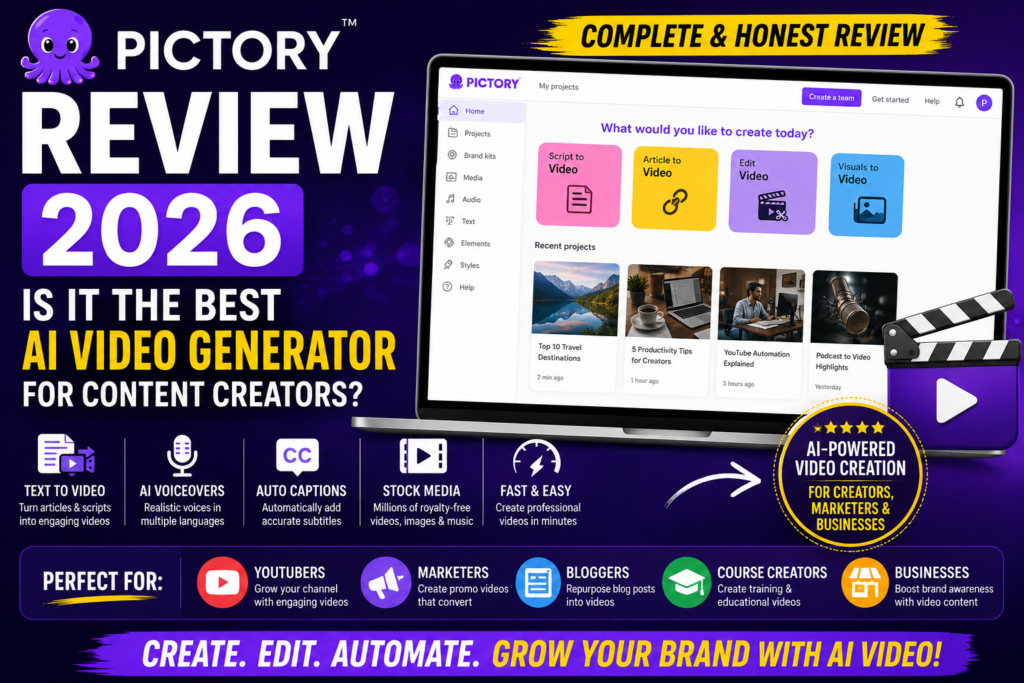
This is where AI video generators have changed the game. Modern AI-powered tools can transform articles, scripts, and ideas into professional-looking videos within minutes. Among these tools, Pictory has emerged as one of the most popular platforms for content creators, marketers, bloggers, and businesses.
Pictory promises to simplify video creation by using artificial intelligence to generate videos from text, automatically add visuals, create captions, and even produce AI voiceovers. This allows creators to produce engaging content without hiring editors or learning complex video software.
In this comprehensive Pictory Review 2026, we’ll examine its features, pricing, pros, cons, alternatives, and real-world use cases to determine whether it truly deserves its reputation as one of the best AI video generators available today.
Quick Verdict
Pictory remains one of the easiest and most efficient AI video creation tools in 2026. Its blog-to-video conversion, automatic captioning, AI voiceovers, and content repurposing capabilities make it especially valuable for bloggers, affiliate marketers, YouTubers, and businesses looking to scale content production.
What is Pictory?
Company Overview
Pictory is an AI-powered video creation platform designed to help users create professional-quality videos without traditional editing skills.
The platform gained popularity by solving a common problem faced by content creators: converting written content into engaging video content quickly and affordably. Instead of spending hours editing footage manually, users can simply provide text, scripts, blog articles, or existing videos, and Pictory handles much of the work automatically.
The company’s mission is to make video creation accessible to everyone, regardless of technical expertise. By leveraging artificial intelligence, Pictory enables businesses and creators to produce more content in less time.
Over the years, the platform has become increasingly popular among marketers, educators, YouTubers, and online entrepreneurs who need consistent video content.
What Makes Pictory Different?
Several features help distinguish Pictory from traditional video editing tools.
Text-to-Video Technology
One of Pictory’s most powerful features is its ability to transform written content into videos automatically.
Users can paste blog posts, articles, or scripts, and the platform generates video scenes using AI.
AI-Powered Video Editing
Pictory removes much of the manual work associated with editing.
Tasks such as scene selection, caption creation, and content summarization can be handled automatically.
Beginner-Friendly Interface
Unlike professional video editors that require extensive training, Pictory is designed for simplicity.
Most users can create videos within minutes.
No Video Editing Experience Required
The platform focuses on automation rather than complex editing workflows, making it accessible to beginners.
Who is Pictory For?
Pictory serves a wide range of users, including:
- YouTubers
- Affiliate marketers
- Bloggers
- Course creators
- Social media marketers
- Businesses
Anyone who regularly creates content can benefit from its AI-powered workflow.
Pictory Features
Text-to-Video Generator
The text-to-video feature remains Pictory’s biggest selling point.
Convert Articles into Videos
Content creators can convert blog posts into engaging videos in just a few minutes.
Benefits include:
- Repurposing existing content
- Expanding audience reach
- Increasing content production speed
- Improving engagement
This is particularly useful for bloggers who want to turn articles into YouTube videos.
Blog-to-Video Conversion
The AI automatically scans article content and identifies important points.
It then creates scenes using stock footage, images, and animations that match the text.
This process dramatically reduces production time.
Automatic Scene Generation
Instead of manually selecting visuals, Pictory automatically matches content with relevant scenes.
Users can still customize these scenes if needed.
Script-to-Video Creation
Pictory also supports direct script-based video generation.
Users can write scripts specifically for:
- YouTube videos
- Sales presentations
- Educational content
- Social media videos
The platform transforms these scripts into complete videos.
Turn Scripts into Videos
Simply paste a script into the editor and allow the AI to generate scenes automatically.
This is ideal for faceless YouTube channels and affiliate marketing videos.
AI Visual Matching
The AI attempts to match visuals with the script content to create a coherent viewing experience.
While not always perfect, it significantly speeds up production.
AI Voiceovers
Pictory includes built-in AI voiceover capabilities.
Users can generate narration without recording their own voice.
Natural-Sounding Narration
The voice quality has improved significantly in recent years.
Many voices sound surprisingly realistic and professional.
Multiple Voice Options
Users can choose from:
- Male voices
- Female voices
- Different accents
- Various speaking styles
This flexibility helps match videos to specific audiences.
AI Video Editing
Beyond video generation, Pictory also provides AI-powered editing tools.
Automatic Video Summarization
Content creators can upload long-form videos and automatically generate shorter versions.
This feature is useful for:
- Creating highlights
- Producing social clips
- Repurposing webinars
- Extracting key moments
Create Short Clips from Long Videos
A one-hour webinar can quickly become multiple short-form videos for social media distribution.
Remove Filler Words
Pictory can automatically identify and remove common filler words such as:
- Um
- Uh
- You know
- Like
This improves the professionalism of recorded content.
Clean Audio Automatically
The AI helps streamline editing by reducing unnecessary speech patterns.
Smart Video Trimming
Video trimming is another area where Pictory saves time.
The platform can identify key moments and remove unnecessary sections automatically.
This speeds up the editing workflow significantly.
Social Media Video Creation
Short-form video content continues to dominate social media platforms in 2026. Pictory helps creators quickly produce videos optimized for various platforms.
YouTube Shorts
YouTube Shorts have become one of the fastest ways to grow a channel.
Pictory allows users to:
- Create vertical videos
- Add captions automatically
- Include AI voiceovers
- Repurpose existing content
This makes it ideal for faceless YouTube automation channels.
Instagram Reels
Instagram remains heavily focused on video content.
Pictory helps marketers and creators generate:
- Educational reels
- Promotional content
- Brand awareness videos
- Product showcases
TikTok Videos
TikTok continues to drive massive organic reach.
Users can quickly create engaging TikTok-style content without advanced editing skills.
Facebook Video Content
Businesses can also use Pictory to create:
- Promotional videos
- Product demonstrations
- Customer testimonials
- Educational content
This helps increase engagement across Facebook pages and advertising campaigns.
Stock Media Library
Creating videos becomes much easier when you have access to quality media assets.
Royalty-Free Images
Pictory provides access to a large collection of royalty-free images.
Benefits include:
- Professional visuals
- No copyright concerns
- Faster content creation
Stock Videos
The platform includes an extensive stock video library that can be automatically matched to your script.
This significantly reduces the need to source external footage.
Music Library
Users can enhance videos with background music.
The library includes:
- Royalty-free tracks
- Multiple genres
- Different moods and styles
Visual Assets
Additional assets such as icons, animations, and graphics help improve video quality and engagement.
AI Subtitles & Captions
Captions have become essential for modern video marketing.
Many viewers watch videos without sound, especially on mobile devices.
Automatic Caption Generation
Pictory automatically generates subtitles for videos.
This helps:
- Improve accessibility
- Increase engagement
- Enhance viewer retention
Multi-Language Support
The platform supports multiple languages, allowing creators to reach international audiences.
This feature is particularly useful for businesses targeting global markets.
Accessibility Benefits
Captions make content more accessible for:
- Hearing-impaired viewers
- Non-native speakers
- Mobile users
This can significantly increase video performance.
Brand Customization
Maintaining a consistent brand identity is important for businesses and creators.
Logos
Users can upload and display custom logos across videos.
Colors
Brand colors can be applied throughout projects to maintain consistency.
Fonts
Custom font options help businesses align videos with their visual identity.
Consistent Branding
By using logos, colors, and fonts consistently, creators can build stronger brand recognition across platforms.
Team Collaboration
Pictory also supports collaborative workflows for teams and agencies.
Shared Projects
Multiple team members can work on video projects together.
This improves efficiency and communication.
Workflow Management
Businesses can organize content production processes more effectively.
This is especially useful for:
- Marketing teams
- Agencies
- Content departments
Business Use Cases
Teams can use Pictory for:
- Internal training videos
- Marketing campaigns
- Product demonstrations
- Educational content
Pictory Pricing
Pictory offers multiple pricing plans designed for different user needs.
Free Trial
The free trial allows users to test the platform before committing to a paid plan.
Features Included
Typically, users can:
- Create sample videos
- Test AI features
- Explore editing tools
Limitations
The trial includes restrictions such as:
- Limited exports
- Watermarked videos
- Reduced usage limits
Despite these limitations, it provides a good introduction to the platform.
Standard Plan
Pricing
The Standard Plan is designed for individual creators and beginners.
Features
Users generally receive:
- Video creation tools
- AI captions
- Access to stock media
- Basic branding options
Best For
- Beginners
- Bloggers
- New content creators
Premium Plan
Pricing
The Premium Plan unlocks more advanced capabilities.
Features
Additional benefits include:
- Higher video limits
- More voiceover options
- Expanded media access
- Enhanced customization
Best For
- YouTubers
- Affiliate marketers
- Professional content creators
Teams Plan
Pricing
The Teams Plan is designed for businesses and agencies.
Features
It typically includes:
- Multiple user accounts
- Team collaboration tools
- Shared project management
- Advanced business functionality
Best For
- Marketing agencies
- Content teams
- Businesses
Is Pictory Worth the Cost?
Value Analysis
Pictory provides significant value for creators who regularly produce video content.
Instead of:
- Hiring editors
- Purchasing expensive software
- Spending hours editing manually
Users can create videos quickly through AI automation.
Comparison with Competitors
Compared with tools like InVideo, Lumen5, and Veed.io, Pictory stands out because of:
- Strong blog-to-video conversion
- Excellent content repurposing features
- Ease of use
- Fast production workflow
Best Users for Paid Plans
The paid plans deliver the most value for:
- Affiliate marketers
- Bloggers
- YouTubers
- Course creators
- Social media marketers
- Small businesses
Pictory Pros
Pros
✔ Easy-to-Use Interface
One of Pictory’s biggest strengths is its simplicity. Even users with no video editing experience can create professional-looking videos within minutes.
✔ Fast Video Creation
Traditional video editing can take hours. Pictory dramatically reduces production time by automating scene creation, captions, and voiceovers.
✔ Blog-to-Video Conversion
The ability to turn articles into videos is one of Pictory’s most valuable features for bloggers and content marketers.
✔ AI Voiceovers Included
Users can generate professional narrations without recording their own voice.
✔ Automatic Captions
Captions improve accessibility and engagement, especially on social media platforms where many users watch videos without sound.
✔ Large Stock Media Library
Access to royalty-free videos, images, and music helps creators produce content without purchasing additional assets.
✔ Excellent for Content Repurposing
Creators can transform blogs, webinars, podcasts, and long-form videos into multiple content formats.
✔ No Editing Skills Required
Pictory removes the technical barriers often associated with video production.
Pictory Cons
Cons
✘ Limited Advanced Video Editing
Professional editors may find the editing capabilities too basic compared to software like Adobe Premiere Pro.
✘ Premium Plans Can Be Expensive
As usage increases, costs may become significant for some users.
✘ AI Visuals May Need Adjustments
While the AI generally performs well, users may occasionally need to replace automatically selected visuals.
✘ Less Flexibility Than Professional Editors
Advanced animation, transitions, and effects remain limited.
✘ Some Stock Media Can Feel Generic
Since many users access the same stock libraries, some visuals may lack uniqueness.
Pictory vs InVideo
Both Pictory and InVideo are popular AI video creation platforms, but they serve slightly different audiences.
Ease of Use
Pictory focuses heavily on automation and simplicity.
InVideo offers more editing flexibility but comes with a slightly steeper learning curve.
Winner: Pictory
AI Video Generation
Pictory excels at converting articles and scripts into videos automatically.
Winner: Pictory
Editing Features
InVideo provides more advanced editing tools and creative control.
Winner: InVideo
Stock Media
Both platforms offer large media libraries, although InVideo’s collection is slightly larger.
Winner: InVideo
Pricing
Pricing is relatively competitive between the two platforms.
Winner: Tie
Which One Should You Choose?
Choose Pictory if:
- You want fast AI video creation
- You create blog content regularly
- You need content repurposing tools
- You prefer simplicity
Choose InVideo if:
- You need more editing flexibility
- You want greater creative control
- You produce highly customized videos
Comparison Table
| Feature | Pictory | InVideo |
|---|---|---|
| AI Video Creation | ⭐⭐⭐⭐⭐ | ⭐⭐⭐⭐ |
| Ease of Use | ⭐⭐⭐⭐⭐ | ⭐⭐⭐⭐ |
| Editing Tools | ⭐⭐⭐⭐ | ⭐⭐⭐⭐⭐ |
| Voiceovers | ⭐⭐⭐⭐ | ⭐⭐⭐⭐ |
| Stock Media | ⭐⭐⭐⭐ | ⭐⭐⭐⭐⭐ |
| Pricing | Medium | Medium |
Pictory Use Cases
Affiliate Marketing
Pictory is particularly useful for affiliate marketers.
Product Review Videos
Convert written reviews into engaging video content.
Comparison Videos
Create product comparison videos quickly and efficiently.
Promotional Content
Produce promotional videos for affiliate campaigns without hiring editors.
Blogging
Bloggers can maximize content reach through video repurposing.
Blog-to-Video Conversion
Turn existing articles into YouTube videos and social media content.
Content Repurposing
Extract additional value from published content.
Traffic Generation
Videos can attract new audiences and drive visitors back to blog posts.
YouTube Automation
Pictory is widely used for faceless YouTube channels.
Faceless Channels
Generate videos without appearing on camera.
Shorts Creation
Produce short-form content for rapid channel growth.
Educational Videos
Create informative videos using AI-generated visuals and narration.
Social Media Marketing
Social media marketers can produce content at scale.
Reels
Create engaging Instagram Reels quickly.
Shorts
Repurpose long-form content into short videos.
Promotional Videos
Support product launches and marketing campaigns.
Course Creators
Educational content creators can use Pictory to improve learning experiences.
Lesson Videos
Transform lessons into engaging visual content.
Training Content
Develop training materials efficiently.
Educational Materials
Create supporting resources for students and learners.
Who Should Use Pictory?
Best For
✔ Affiliate Marketers
Excellent for creating product review and promotional videos.
✔ Bloggers
Ideal for turning articles into video content.
✔ YouTubers
Great for faceless channels and content scaling.
✔ Social Media Creators
Useful for producing short-form content consistently.
✔ Course Creators
Helps create professional educational videos.
✔ Small Businesses
Affordable solution for marketing video creation.
✔ Content Marketers
Supports large-scale content repurposing strategies.
Not Ideal For
✘ Professional Video Editors
Advanced editors may require more sophisticated tools.
✘ Users Needing Advanced Animation
Complex motion graphics remain limited.
✘ Film Production Teams
Pictory is designed for marketing and content creation rather than cinematic production.
✘ Users Wanting Full Creative Control
The AI-driven workflow prioritizes speed over customization.
Pictory Alternatives
InVideo
Strong editing capabilities and extensive templates.
Synthesia
Popular for AI avatar-based video creation.
Canva AI Video
Easy-to-use video creation within Canva’s ecosystem.
Lumen5
Well-known for blog-to-video conversion.
Veed.io
Combines editing, subtitles, and AI features.
Runway ML
Advanced AI video generation and editing platform.
Final Verdict
Pictory remains one of the best AI video generators available in 2026.
Its biggest strengths include:
✔ Blog-to-video conversion
✔ AI video creation
✔ Automatic captions
✔ Voiceovers
✔ Content repurposing
✔ Easy-to-use interface
The platform successfully removes many of the barriers associated with traditional video production. By automating editing tasks and simplifying workflows, Pictory allows creators to focus on content rather than technical processes.
For bloggers, affiliate marketers, YouTubers, and businesses looking to create videos quickly, Pictory offers one of the easiest and most efficient solutions available.
Overall Rating: 9.0/10
Ease of Use: 9.5/10
Features: 9.0/10
Video Quality: 8.8/10
AI Capabilities: 9.1/10
Pricing: 8.5/10
Value for Money: 9.0/10
Final Recommendation
For Bloggers
Highly recommended for converting articles into engaging video content.
For Affiliate Marketers
Excellent tool for product reviews, comparisons, and promotional videos.
For YouTubers
Ideal for faceless channels, Shorts, and content scaling.
For Course Creators
Useful for producing educational and training materials.
For Businesses
A cost-effective way to create professional marketing videos.
FAQ
Is Pictory free?
Pictory offers a free trial, allowing users to test its features before purchasing a paid plan.
Is Pictory better than InVideo?
Pictory is generally better for automated content creation and blog-to-video conversion, while InVideo offers more advanced editing capabilities.
Can Pictory convert blog posts into videos?
Yes. This is one of Pictory’s strongest features and a major reason for its popularity.
Is Pictory good for YouTube automation?
Absolutely. Many creators use Pictory to build and scale faceless YouTube channels.
Is Pictory worth it in 2026?
Yes. For creators who regularly produce content, Pictory provides excellent value by reducing video production time and simplifying workflows.
Affiliate Disclosure
This article may contain affiliate links. If you purchase through our links, SaaSERAA may earn a commission at no additional cost to you. This helps us continue testing and reviewing AI tools independently and providing honest recommendations.